Open_WithParams
OpenLvVision_OpenCv.lvlib:VideoWriter.lvclass:VideoWriter Open_WithParams.vi
Initializes or reinitializes video writer.
For detailed information, please refer to the OpenCV documentation
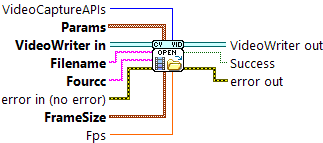
| error in (no error) The error in cluster can accept error information wired from VIs previously called. Use this information to decide if any functionality should be bypassed in the event of errors from other VIs. The pop-up option Explain Error (or Explain Warning) gives more information about the error displayed. |

| status The status boolean is either TRUE (X) for an error, or FALSE (checkmark) for no error or a warning. The pop-up option Explain Error (or Explain Warning) gives more information about the error displayed. |

| code The code input identifies the error or warning. The pop-up option Explain Error (or Explain Warning) gives more information about the error displayed. |

| source The source string describes the origin of the error or warning. The pop-up option Explain Error (or Explain Warning) gives more information about the error displayed. |

| VideoWriter in |

| Filename Name of the output video file. |
| Fourcc 4-character code of codec used to compress the frames. For example, VideoWriter::fourcc('P','I','M','1') is a MPEG-1 codec, VideoWriter::fourcc('M','J','P','G') is a motion-jpeg codec etc. |
| FrameSize Size of the video frames. |

| X |
| Y |
| Fps Framerate of the created video stream. |

| VideoCaptureAPIs |
| Params The params parameter allows to specify extra parameters |

| Param |
| VideoCaptureProperty |
| Value |
| error out The error out cluster passes error or warning information out of a VI to be used by other VIs. The pop-up option Explain Error (or Explain Warning) gives more information about the error displayed. |

| status The status boolean is either TRUE (X) for an error, or FALSE (checkmark) for no error or a warning. The pop-up option Explain Error (or Explain Warning) gives more information about the error displayed. |

| code The code input identifies the error or warning. The pop-up option Explain Error (or Explain Warning) gives more information about the error displayed. |

| source The source string describes the origin of the error or warning. The pop-up option Explain Error (or Explain Warning) gives more information about the error displayed. |

| VideoWriter out |

| Success Returns true if video writer has been successfully initialized. |