Set
OpenLvVision_OpenCv.lvlib:VideoCapture.lvclass:VideoCapture Set.vi
Returns the specified VideoCapture property.
Reading / writing properties involves many layers. Some unexpected result might happens along this chain.
The returned value might be different from what really used by the device or it could be encoded using device dependent rules (eg. steps or percentage). Effective behaviour depends from device driver and API Backe
For detailed information, please refer to the OpenCV documentation
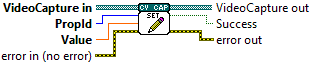
| error in (no error) The error in cluster can accept error information wired from VIs previously called. Use this information to decide if any functionality should be bypassed in the event of errors from other VIs. The pop-up option Explain Error (or Explain Warning) gives more information about the error displayed. |

| status The status boolean is either TRUE (X) for an error, or FALSE (checkmark) for no error or a warning. The pop-up option Explain Error (or Explain Warning) gives more information about the error displayed. |

| code The code input identifies the error or warning. The pop-up option Explain Error (or Explain Warning) gives more information about the error displayed. |

| source The source string describes the origin of the error or warning. The pop-up option Explain Error (or Explain Warning) gives more information about the error displayed. |

| VideoCapture in |

| PropId Property identifier from cv::VideoCaptureProperties (eg. cv::CAP_PROP_POS_MSEC, cv::CAP_PROP_POS_FRAMES, ...) or one from Additional flags for video I/O API backends |
| Value Value of the property. |

| error out The error out cluster passes error or warning information out of a VI to be used by other VIs. The pop-up option Explain Error (or Explain Warning) gives more information about the error displayed. |

| status The status boolean is either TRUE (X) for an error, or FALSE (checkmark) for no error or a warning. The pop-up option Explain Error (or Explain Warning) gives more information about the error displayed. |

| code The code input identifies the error or warning. The pop-up option Explain Error (or Explain Warning) gives more information about the error displayed. |

| source The source string describes the origin of the error or warning. The pop-up option Explain Error (or Explain Warning) gives more information about the error displayed. |

| VideoCapture out |

| Success true if the property is supported by backend used by the VideoCapture instance. |