Retrieve
OpenLvVision_OpenCv.lvlib:VideoCapture.lvclass:VideoCapture Retrieve.vi
Decodes and returns the grabbed video frame.
The method decodes and returns the just grabbed frame. If no frames has been grabbed (camera has been disconnected, or there are no more frames in video file), the method returns false and the function returns an empty image (with cv::Mat, test it with Mat::empty()).
For detailed information, please refer to the OpenCV documentation
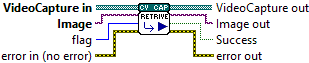
| error in (no error) The error in cluster can accept error information wired from VIs previously called. Use this information to decide if any functionality should be bypassed in the event of errors from other VIs. The pop-up option Explain Error (or Explain Warning) gives more information about the error displayed. |

| status The status boolean is either TRUE (X) for an error, or FALSE (checkmark) for no error or a warning. The pop-up option Explain Error (or Explain Warning) gives more information about the error displayed. |

| code The code input identifies the error or warning. The pop-up option Explain Error (or Explain Warning) gives more information about the error displayed. |

| source The source string describes the origin of the error or warning. The pop-up option Explain Error (or Explain Warning) gives more information about the error displayed. |

| VideoCapture in |

| Image image the video frame is returned here. If no frames has been grabbed the image will be empty. |

| flag it could be a frame index or a driver specific flag |
| error out The error out cluster passes error or warning information out of a VI to be used by other VIs. The pop-up option Explain Error (or Explain Warning) gives more information about the error displayed. |

| status The status boolean is either TRUE (X) for an error, or FALSE (checkmark) for no error or a warning. The pop-up option Explain Error (or Explain Warning) gives more information about the error displayed. |

| code The code input identifies the error or warning. The pop-up option Explain Error (or Explain Warning) gives more information about the error displayed. |

| source The source string describes the origin of the error or warning. The pop-up option Explain Error (or Explain Warning) gives more information about the error displayed. |

| VideoCapture out |

| Success |
| Image out image the video frame is returned here. If no frames has been grabbed the image will be empty. |
