Open_File
OpenLvVision_OpenCv.lvlib:VideoCapture.lvclass:VideoCapture Open_File.vi
Opens a video file or a capturing device or an IP video stream for video capturing with API Preference.
For detailed information, please refer to the OpenCV documentation
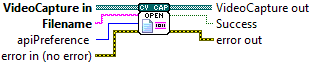
| error in (no error) The error in cluster can accept error information wired from VIs previously called. Use this information to decide if any functionality should be bypassed in the event of errors from other VIs. The pop-up option Explain Error (or Explain Warning) gives more information about the error displayed. |

| status The status boolean is either TRUE (X) for an error, or FALSE (checkmark) for no error or a warning. The pop-up option Explain Error (or Explain Warning) gives more information about the error displayed. |

| code The code input identifies the error or warning. The pop-up option Explain Error (or Explain Warning) gives more information about the error displayed. |

| source The source string describes the origin of the error or warning. The pop-up option Explain Error (or Explain Warning) gives more information about the error displayed. |

| VideoCapture in |

| Filename it can be: name of video file (eg. video.avi) or image sequence (eg. img_%02d.jpg, which will read samples like img_00.jpg, img_01.jpg, img_02.jpg, ...) or URL of video stream (eg. protocol://host:port/script_name?script_params|auth) or GStreamer pipeline string in gst-launch tool format in case if GStreamer is used as backend Note that each video stream or IP camera feed has its own URL scheme. Please refer to the documentation of source stream to know the right URL. |
| apiPreference preferred Capture API backends to use. Can be used to enforce a specific reader implementation if multiple are available |
| error out The error out cluster passes error or warning information out of a VI to be used by other VIs. The pop-up option Explain Error (or Explain Warning) gives more information about the error displayed. |

| status The status boolean is either TRUE (X) for an error, or FALSE (checkmark) for no error or a warning. The pop-up option Explain Error (or Explain Warning) gives more information about the error displayed. |

| code The code input identifies the error or warning. The pop-up option Explain Error (or Explain Warning) gives more information about the error displayed. |

| source The source string describes the origin of the error or warning. The pop-up option Explain Error (or Explain Warning) gives more information about the error displayed. |

| VideoCapture out |

| Success true if the file has been successfully opened |