MatchTemplate
OpenLvVision_OpenCv.lvlib:MatchTemplate.vim
Compares a template against overlapped image regions.
The function slides through image , compares the overlapped patches of size $w \times h$ against templ using the specified method and stores the comparison results in result . TemplateMatchModes describes the formulae for the available comparison methods ($I$ denotes image, $T$ template, $R$ result, $M$ the optional mask ). The summation is done over template and/or the image patch: $x' = 0 \dots w-1, y' = 0 \dots h-1$
After the function finishes the comparison, the best matches can be found as global minimums (when TM_SQDIFF was used) or maximums (when TM_CCORR or TM_CCOEFF was used) using the minMaxLoc function. In case of a color image, template summation in the numerator and each sum in the denominator is done over all of the channels and separate mean values are used for each channel. That is, the function can take a color template and a color image. The result will still be a single-channel image, which is easier to analyze.
For detailed information, please refer to the OpenCV documentation
| error in error in can accept error information wired from VIs previously called. Use this information to decide if any functionality should be bypassed in the event of errors from other VIs. Right-click the error in control on the front panel and select Explain Error or Explain Warning from the shortcut menu for more information about the error. |

| status status is TRUE (X) if an error occurred or FALSE (checkmark) to indicate a warning or that no error occurred. Right-click the error in control on the front panel and select Explain Error or Explain Warning from the shortcut menu for more information about the error. |

| code |

| source source describes the origin of the error or warning. Right-click the error in control on the front panel and select Explain Error or Explain Warning from the shortcut menu for more information about the error. |

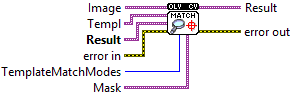
| Image Image where the search is running. It must be 8-bit or 32-bit floating-point. |

| Templ Searched template. It must be not greater than the source image and have the same data type. |
| Result Map of comparison results. It must be single-channel 32-bit floating-point. |
| Mask Optional mask. It must have the same size as templ. It must either have the same number of channels as template or only one channel, which is then used for all template and image channels. If the data type is CV_8U, the mask is interpreted as a binary mask, meaning only elements where mask is nonzero are used and are kept unchanged independent of the actual mask value (weight equals 1). For data tpye CV_32F, the mask values are used as weights. The exact formulas are documented in TemplateMatchModes. |
| TemplateMatchModes type of the template matching operation |

| error out error in can accept error information wired from VIs previously called. Use this information to decide if any functionality should be bypassed in the event of errors from other VIs. Right-click the error in control on the front panel and select Explain Error or Explain Warning from the shortcut menu for more information about the error. |

| status status is TRUE (X) if an error occurred or FALSE (checkmark) to indicate a warning or that no error occurred. Right-click the error in control on the front panel and select Explain Error or Explain Warning from the shortcut menu for more information about the error. |

| code |

| source source describes the origin of the error or warning. Right-click the error in control on the front panel and select Explain Error or Explain Warning from the shortcut menu for more information about the error. |

| Result Map of comparison results. It must be single-channel 32-bit floating-point. |
