Sobel
OpenLvVision_OpenCv.lvlib:Sobel.vim
Calculates the first, second, third, or mixed image derivatives using an extended Sobel operator.
In all cases except one, the $\texttt{ksize} \times \texttt{ksize}$ separable kernel is used to calculate the derivative. When $\texttt{ksize} = 1$, the $3 \times 1$ or $1 \times 3$ kernel is used (that is, no Gaussian smoothing is done). ksize = 1 can only be used for the first or the second $x$- or $y$- derivatives.
There is also the special value ksize = FILTER_SCHARR (-1) that corresponds to the $3 \times 3$ Scharr filter that may give more accurate results than the $3 \times 3$ Sobel. The Scharr aperture for the $x$-derivative is:
or transposed for the $y$-derivative.
The function calculates an image derivative by convolving the image with the appropriate kernel:
The Sobel operators combine Gaussian smoothing and differentiation, so the result is more or less resistant to noise. Most often, the function is called with (xorder = 1, yorder = 0, ksize = 3) or (xorder = 0, yorder = 1, ksize = 3) to calculate the first $x$- or $y$- image derivative.
The first case (x-derivative) corresponds to a kernel of:
The second case (y-derivative) corresponds to a kernel of:
For detailed information, please refer to the OpenCV documentation
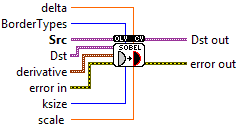
| error in error in can accept error information wired from VIs previously called. Use this information to decide if any functionality should be bypassed in the event of errors from other VIs. Right-click the error in control on the front panel and select Explain Error or Explain Warning from the shortcut menu for more information about the error. |

| status status is TRUE (X) if an error occurred or FALSE (checkmark) to indicate a warning or that no error occurred. Right-click the error in control on the front panel and select Explain Error or Explain Warning from the shortcut menu for more information about the error. |

| code |

| source source describes the origin of the error or warning. Right-click the error in control on the front panel and select Explain Error or Explain Warning from the shortcut menu for more information about the error. |

| Src input image. |

| Dst output image of the same size and the same number of channels as src. |
| BorderTypes pixel extrapolation method, see BorderTypes. BORDER_WRAP is not supported BORDER_CONSTANT = 0, !< `iiiiii|abcdefgh|iiiiiii` with some specified `i` BORDER_REPLICATE = 1, `aaaaaa|abcdefgh|hhhhhhh` BORDER_REFLECT = 2, `fedcba|abcdefgh|hgfedcb` BORDER_WRAP = 3, `cdefgh|abcdefgh|abcdefg` BORDER_REFLECT_101 = 4, `gfedcb|abcdefgh|gfedcba` BORDER_TRANSPARENT = 5, `uvwxyz|abcdefgh|ijklmno` - Treats outliers as transparent. BORDER_ISOLATED = 16 Interpolation restricted within the ROI boundaries. |
| derivative order of the derivatives. |

| X order of the derivative x. |
| Y order of the derivative y. |
| scale optional scale factor for the computed derivative values; by default, no scaling is applied (see getDerivKernels for details). |

| delta optional delta value that is added to the results prior to storing them in dst. |
| ksize size of the extended Sobel kernel; it must be 1, 3, 5, or 7. |
| error out error in can accept error information wired from VIs previously called. Use this information to decide if any functionality should be bypassed in the event of errors from other VIs. Right-click the error in control on the front panel and select Explain Error or Explain Warning from the shortcut menu for more information about the error. |

| status status is TRUE (X) if an error occurred or FALSE (checkmark) to indicate a warning or that no error occurred. Right-click the error in control on the front panel and select Explain Error or Explain Warning from the shortcut menu for more information about the error. |

| code |

| source source describes the origin of the error or warning. Right-click the error in control on the front panel and select Explain Error or Explain Warning from the shortcut menu for more information about the error. |

| Dst out output image of the same size and the same number of channels as src. |
