PyrUp
OpenLvVision_OpenCv.lvlib:PyrUp.vim
Upsamples an image and then blurs it.
By default, size of the output image is computed as Size(src.cols*2, src.rows*2), but in any case, the following conditions should be satisfied:
The function performs the upsampling step of the Gaussian pyramid construction, though it can actually be used to construct the Laplacian pyramid. First, it upsamples the source image by injecting even zero rows and columns and then convolves the result with the same kernel as in pyrDown multiplied by 4.
For detailed information, please refer to the OpenCV documentation
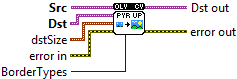
| error in error in can accept error information wired from VIs previously called. Use this information to decide if any functionality should be bypassed in the event of errors from other VIs. Right-click the error in control on the front panel and select Explain Error or Explain Warning from the shortcut menu for more information about the error. |

| status status is TRUE (X) if an error occurred or FALSE (checkmark) to indicate a warning or that no error occurred. Right-click the error in control on the front panel and select Explain Error or Explain Warning from the shortcut menu for more information about the error. |

| code |

| source source describes the origin of the error or warning. Right-click the error in control on the front panel and select Explain Error or Explain Warning from the shortcut menu for more information about the error. |

| Src input image. |

| Dst output image; it has the specified size and the same type as src. |
| BorderTypes Pixel extrapolation method, see BorderTypes (BORDER_CONSTANT isn't supported) BORDER_CONSTANT = 0, !< `iiiiii|abcdefgh|iiiiiii` with some specified `i` BORDER_REPLICATE = 1, `aaaaaa|abcdefgh|hhhhhhh` BORDER_REFLECT = 2, `fedcba|abcdefgh|hgfedcb` BORDER_WRAP = 3, `cdefgh|abcdefgh|abcdefg` BORDER_REFLECT_101 = 4, `gfedcb|abcdefgh|gfedcba` BORDER_TRANSPARENT = 5, `uvwxyz|abcdefgh|ijklmno` - Treats outliers as transparent. BORDER_ISOLATED = 16 Interpolation restricted within the ROI boundaries. |
| dstSize size of the output image. |

| X |
| Y |
| error out error in can accept error information wired from VIs previously called. Use this information to decide if any functionality should be bypassed in the event of errors from other VIs. Right-click the error in control on the front panel and select Explain Error or Explain Warning from the shortcut menu for more information about the error. |

| status status is TRUE (X) if an error occurred or FALSE (checkmark) to indicate a warning or that no error occurred. Right-click the error in control on the front panel and select Explain Error or Explain Warning from the shortcut menu for more information about the error. |

| code |

| source source describes the origin of the error or warning. Right-click the error in control on the front panel and select Explain Error or Explain Warning from the shortcut menu for more information about the error. |

| Dst out output image; it has the specified size and the same type as src. |
