MorphologyEx
OpenLvVision_OpenCv.lvlib:MorphologyEx.vim
Performs advanced morphological transformations.
The function cv::morphologyEx can perform advanced morphological transformations using an erosion and dilation as basic operations.
Any of the operations can be done in-place. In case of multi-channel images, each channel is processed independently.
For detailed information, please refer to the OpenCV documentation
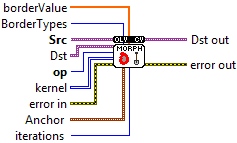
| error in error in can accept error information wired from VIs previously called. Use this information to decide if any functionality should be bypassed in the event of errors from other VIs. Right-click the error in control on the front panel and select Explain Error or Explain Warning from the shortcut menu for more information about the error. |

| status status is TRUE (X) if an error occurred or FALSE (checkmark) to indicate a warning or that no error occurred. Right-click the error in control on the front panel and select Explain Error or Explain Warning from the shortcut menu for more information about the error. |

| code |

| source source describes the origin of the error or warning. Right-click the error in control on the front panel and select Explain Error or Explain Warning from the shortcut menu for more information about the error. |

| Src Source image. The number of channels can be arbitrary. The depth should be one of CV_8U, CV_16U, CV_16S, CV_32F or CV_64F. |

| Dst Destination image of the same size and type as source image. |
| BorderTypes border mode used to extrapolate pixels outside of the image, see BorderTypes. BORDER_WRAP is not supported. BORDER_CONSTANT = 0, !< `iiiiii|abcdefgh|iiiiiii` with some specified `i` BORDER_REPLICATE = 1, `aaaaaa|abcdefgh|hhhhhhh` BORDER_REFLECT = 2, `fedcba|abcdefgh|hgfedcb` BORDER_WRAP = 3, `cdefgh|abcdefgh|abcdefg` BORDER_REFLECT_101 = 4, `gfedcb|abcdefgh|gfedcba` BORDER_TRANSPARENT = 5, `uvwxyz|abcdefgh|ijklmno` - Treats outliers as transparent. BORDER_ISOLATED = 16 Interpolation restricted within the ROI boundaries. |
| Anchor Anchor position with the kernel. Negative values mean that the anchor is at the kernel center. |

| X |
| Y |
| kernel Structuring element. It can be created using getStructuringElement. |

|

| iterations Number of times erosion and dilation are applied. |
| borderValue Border value in case of a constant border. The default value has a special meaning. |

|

| op type of morphological operation MORPH_HITMISS: see erode.vi MORPH_DILATE: see dilate MORPH_OPEN: an opening operation MORPH_CLOSE: a closing operation MORPH_GRADIENT: a morphological gradient MORPH_TOPHAT: op hat MORPH_BLACKHAT :black hat MORPH_HITMISS :"hit or miss" .- Only supported for CV_8UC1 binary images. A tutorial can be found in the documentation |

| error out error in can accept error information wired from VIs previously called. Use this information to decide if any functionality should be bypassed in the event of errors from other VIs. Right-click the error in control on the front panel and select Explain Error or Explain Warning from the shortcut menu for more information about the error. |

| status status is TRUE (X) if an error occurred or FALSE (checkmark) to indicate a warning or that no error occurred. Right-click the error in control on the front panel and select Explain Error or Explain Warning from the shortcut menu for more information about the error. |

| code |

| source source describes the origin of the error or warning. Right-click the error in control on the front panel and select Explain Error or Explain Warning from the shortcut menu for more information about the error. |

| Dst out Destination image of the same size and type as source image. |
