GetStructuringElement
OpenLvVision_OpenCv.lvlib:GetStructuringElement.vi
Returns a structuring element of the specified size and shape for morphological operations.
The function constructs and returns the structuring element that can be further passed to erode, dilate or morphologyEx. But you can also construct an arbitrary binary mask yourself and use it as the structuring element.
For detailed information, please refer to the OpenCV documentation
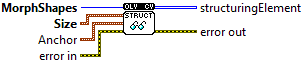
| error in error in can accept error information wired from VIs previously called. Use this information to decide if any functionality should be bypassed in the event of errors from other VIs. Right-click the error in control on the front panel and select Explain Error or Explain Warning from the shortcut menu for more information about the error. |

| status status is TRUE (X) if an error occurred or FALSE (checkmark) to indicate a warning or that no error occurred. Right-click the error in control on the front panel and select Explain Error or Explain Warning from the shortcut menu for more information about the error. |

| code |

| source source describes the origin of the error or warning. Right-click the error in control on the front panel and select Explain Error or Explain Warning from the shortcut menu for more information about the error. |

| Size Size of the structuring element. |

| X |
| Y |
| Anchor anchor point; default value Point(-1,-1) means that the anchor is at the center. Note that only the shape of a cross-shaped element depends on the anchor position. In other cases the anchor just regulates how much the result of the morphological operation is shifted. |
| X |
| Y |
| MorphShapes shape of the structuring element MORPH_RECT = a rectangular structuring element MORPH_CROSS = a cross-shaped structuring element: MORPH_ELLIPSE = an elliptic structuring element, that is, a filled ellipse inscribed into the rectangle Rect(0, 0, esize.width, esize.height) |

| error out error in can accept error information wired from VIs previously called. Use this information to decide if any functionality should be bypassed in the event of errors from other VIs. Right-click the error in control on the front panel and select Explain Error or Explain Warning from the shortcut menu for more information about the error. |

| status status is TRUE (X) if an error occurred or FALSE (checkmark) to indicate a warning or that no error occurred. Right-click the error in control on the front panel and select Explain Error or Explain Warning from the shortcut menu for more information about the error. |

| code |

| source source describes the origin of the error or warning. Right-click the error in control on the front panel and select Explain Error or Explain Warning from the shortcut menu for more information about the error. |

| structuringElement Output StructuringElement |

|
