GetGaussianKernel
OpenLvVision_OpenCv.lvlib:GetGaussianKernel.vi
Returns Gaussian filter coefficients.
The function computes and returns the ksize $\times 1$ matrix of Gaussian filter coefficients:
where $i = 0 \dots \texttt{ksize} - 1$ and $\alpha$ is the scale factor chosen so that $\sum_i G_i = 1$.
Two of such generated kernels can be passed to sepFilter2D. Those functions automatically recognize smoothing kernels (a symmetrical kernel with sum of weights equal to 1) and handle them accordingly. You may also use the higher-level GaussianBlur.
For detailed information, please refer to the OpenCV documentation
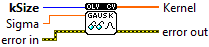
| error in error in can accept error information wired from VIs previously called. Use this information to decide if any functionality should be bypassed in the event of errors from other VIs. Right-click the error in control on the front panel and select Explain Error or Explain Warning from the shortcut menu for more information about the error. |

| status status is TRUE (X) if an error occurred or FALSE (checkmark) to indicate a warning or that no error occurred. Right-click the error in control on the front panel and select Explain Error or Explain Warning from the shortcut menu for more information about the error. |

| code |

| source source describes the origin of the error or warning. Right-click the error in control on the front panel and select Explain Error or Explain Warning from the shortcut menu for more information about the error. |

| kSize Aperture size. |
| Sigma Gaussian standard deviation. If it is non-positive, it is computed from ksize as sigma = 0.3*((ksize-1)*0.5 - 1) + 0.8. |

| error out error in can accept error information wired from VIs previously called. Use this information to decide if any functionality should be bypassed in the event of errors from other VIs. Right-click the error in control on the front panel and select Explain Error or Explain Warning from the shortcut menu for more information about the error. |

| status status is TRUE (X) if an error occurred or FALSE (checkmark) to indicate a warning or that no error occurred. Right-click the error in control on the front panel and select Explain Error or Explain Warning from the shortcut menu for more information about the error. |

| code |

| source source describes the origin of the error or warning. Right-click the error in control on the front panel and select Explain Error or Explain Warning from the shortcut menu for more information about the error. |

| Kernel Output kernel |

|
