GetDerivKernels
OpenLvVision_OpenCv.lvlib:GetDerivKernels.vi
Returns filter coefficients for computing spatial image derivatives.
The function computes and returns the filter coefficients for spatial image derivatives. When ksize=FILTER_SCHARR, the Scharr kernels are generated (see Scharr). Otherwise, Sobel kernels are generated (see Sobel). The filters are normally passed to sepFilter2D or to
For detailed information, please refer to the OpenCV documentation
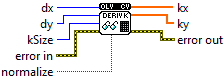
| error in error in can accept error information wired from VIs previously called. Use this information to decide if any functionality should be bypassed in the event of errors from other VIs. Right-click the error in control on the front panel and select Explain Error or Explain Warning from the shortcut menu for more information about the error. |

| status status is TRUE (X) if an error occurred or FALSE (checkmark) to indicate a warning or that no error occurred. Right-click the error in control on the front panel and select Explain Error or Explain Warning from the shortcut menu for more information about the error. |

| code |

| source source describes the origin of the error or warning. Right-click the error in control on the front panel and select Explain Error or Explain Warning from the shortcut menu for more information about the error. |

| dx Derivative order in respect of x. |
| dy Derivative order in respect of y. |
| kSize Aperture size. It can be FILTER_SCHARR, 1, 3, 5, or 7. |
| normalize Flag indicating whether to normalize (scale down) the filter coefficients or not. Theoretically, the coefficients should have the denominator . If you are going to filter floating-point images, you are likely to use the normalized kernels. But if you compute derivatives of an 8-bit image, store the results in a 16-bit image, and wish to preserve all the fractional bits, you may want to set normalize=false . |
| error out error in can accept error information wired from VIs previously called. Use this information to decide if any functionality should be bypassed in the event of errors from other VIs. Right-click the error in control on the front panel and select Explain Error or Explain Warning from the shortcut menu for more information about the error. |

| status status is TRUE (X) if an error occurred or FALSE (checkmark) to indicate a warning or that no error occurred. Right-click the error in control on the front panel and select Explain Error or Explain Warning from the shortcut menu for more information about the error. |

| code |

| source source describes the origin of the error or warning. Right-click the error in control on the front panel and select Explain Error or Explain Warning from the shortcut menu for more information about the error. |

| kx Output matrix of row filter coefficients. It has the type ktype . |

|

| ky Output matrix of column filter coefficients. It has the type ktype . |
|