BoxFilter
OpenLvVision_OpenCv.lvlib:BoxFilter.vim
Blurs an image using the box filter.
The function smooths an image using the kernel:
where
Unnormalized box filter is useful for computing various integral characteristics over each pixel neighborhood, such as covariance matrices of image derivatives (used in dense optical flow algorithms, and so on). If you need to compute pixel sums over variable-size windows, use integral.
For detailed information, please refer to the OpenCV documentation
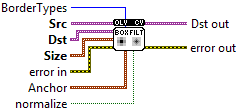
| error in error in can accept error information wired from VIs previously called. Use this information to decide if any functionality should be bypassed in the event of errors from other VIs. Right-click the error in control on the front panel and select Explain Error or Explain Warning from the shortcut menu for more information about the error. |

| status status is TRUE (X) if an error occurred or FALSE (checkmark) to indicate a warning or that no error occurred. Right-click the error in control on the front panel and select Explain Error or Explain Warning from the shortcut menu for more information about the error. |

| code |

| source source describes the origin of the error or warning. Right-click the error in control on the front panel and select Explain Error or Explain Warning from the shortcut menu for more information about the error. |

| Src input image; it can have any number of channels, which are processed independently, but the depth should be CV_8U, CV_16U, CV_16S, CV_32F or CV_64F. |

| Dst output image of the same size and type as src. |
| BorderTypes border mode used to extrapolate pixels outside of the image, see BorderTypes. BORDER_WRAP is not supported. BORDER_CONSTANT = 0, !< `iiiiii|abcdefgh|iiiiiii` with some specified `i` BORDER_REPLICATE = 1, `aaaaaa|abcdefgh|hhhhhhh` BORDER_REFLECT = 2, `fedcba|abcdefgh|hgfedcb` BORDER_WRAP = 3, `cdefgh|abcdefgh|abcdefg` BORDER_REFLECT_101 = 4, `gfedcb|abcdefgh|gfedcba` BORDER_TRANSPARENT = 5, `uvwxyz|abcdefgh|ijklmno` - Treats outliers as transparent. BORDER_ISOLATED = 16 Interpolation restricted within the ROI boundaries. |
| Size blurring kernel size. |

| X |
| Y |
| Anchor anchor point; default value Point(-1,-1) means that the anchor is at the kernel center. |
| X |
| Y |
| normalize flag, specifying whether the kernel is normalized by its area or not. |
| error out error in can accept error information wired from VIs previously called. Use this information to decide if any functionality should be bypassed in the event of errors from other VIs. Right-click the error in control on the front panel and select Explain Error or Explain Warning from the shortcut menu for more information about the error. |

| status status is TRUE (X) if an error occurred or FALSE (checkmark) to indicate a warning or that no error occurred. Right-click the error in control on the front panel and select Explain Error or Explain Warning from the shortcut menu for more information about the error. |

| code |

| source source describes the origin of the error or warning. Right-click the error in control on the front panel and select Explain Error or Explain Warning from the shortcut menu for more information about the error. |

| Dst out output image of the same size and type as src. |
