WarpPolar
OpenLvVision_OpenCv.lvlib:WarpPolar.vim
Remaps an image to polar or semilog-polar coordinates space.
The function transforms the source image using the following mapping:
where
and
Linear vs semilog mapping
Polar mapping can be linear or semi-log. Add one of WarpPolarMode to the flags to specify the mapping mode.
Linear mapping is the default.
The semilog mapping emulates human “foveal” vision, providing high acuity near the center and lower acuity in the periphery.
Output image size rules:
- If both values in
dsize ≤ 0(default):
- If only
dsize.height ≤ 0:
- If both values in
dsize > 0:
The destination image will have the specified size, and the bounding circle area is scaled accordingly.
For detailed information, please refer to the OpenCV documentation
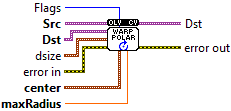
| error in error in can accept error information wired from VIs previously called. Use this information to decide if any functionality should be bypassed in the event of errors from other VIs. Right-click the error in control on the front panel and select Explain Error or Explain Warning from the shortcut menu for more information about the error. |

| status status is TRUE (X) if an error occurred or FALSE (checkmark) to indicate a warning or that no error occurred. Right-click the error in control on the front panel and select Explain Error or Explain Warning from the shortcut menu for more information about the error. |

| code |

| source source describes the origin of the error or warning. Right-click the error in control on the front panel and select Explain Error or Explain Warning from the shortcut menu for more information about the error. |

| Src input image. |

| Dst output image that has the size dsize and the same type as src . |
| dsize The destination image size (see description for valid options). |

| X |
| Y |
| center The transformation center. |
| X |

| Y |
| maxRadius The radius of the bounding circle to transform. It determines the inverse magnitude scale parameter too. |

| Flags A combination of interpolation methods, InterpolationFlags + WarpPolarMode. Add WARP_POLAR_LINEAR to select linear polar mapping (default) Add WARP_POLAR_LOG to select semilog polar mapping Add WARP_INVERSE_MAP for reverse mapping. |
| error out error in can accept error information wired from VIs previously called. Use this information to decide if any functionality should be bypassed in the event of errors from other VIs. Right-click the error in control on the front panel and select Explain Error or Explain Warning from the shortcut menu for more information about the error. |

| status status is TRUE (X) if an error occurred or FALSE (checkmark) to indicate a warning or that no error occurred. Right-click the error in control on the front panel and select Explain Error or Explain Warning from the shortcut menu for more information about the error. |

| code |

| source source describes the origin of the error or warning. Right-click the error in control on the front panel and select Explain Error or Explain Warning from the shortcut menu for more information about the error. |

| Dst output image that has the size dsize and the same type as src . |
