WarpPerspective
OpenLvVision_OpenCv.lvlib:WarpPerspective.vim
Applies a perspective transformation to an image.
The function warpPerspective transforms the source image using the specified matrix:
This formula is used when the flag WARP_INVERSE_MAP is set. Otherwise, the transformation matrix is first inverted using invert and then applied.
The function cannot operate in-place.
For detailed information, please refer to the OpenCV documentation
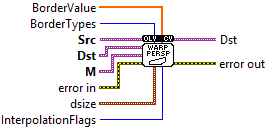
| error in error in can accept error information wired from VIs previously called. Use this information to decide if any functionality should be bypassed in the event of errors from other VIs. Right-click the error in control on the front panel and select Explain Error or Explain Warning from the shortcut menu for more information about the error. |

| status status is TRUE (X) if an error occurred or FALSE (checkmark) to indicate a warning or that no error occurred. Right-click the error in control on the front panel and select Explain Error or Explain Warning from the shortcut menu for more information about the error. |

| code |

| source source describes the origin of the error or warning. Right-click the error in control on the front panel and select Explain Error or Explain Warning from the shortcut menu for more information about the error. |

| Src input image. |

| Dst output image that has the size dsize and the same type as src . |
| M 3x3 transformation matrix. |
| BorderTypes pixel extrapolation method (see BorderTypes); when borderMode=BORDER_TRANSPARENT, it means that the pixels in the destination image corresponding to the "outliers" in the source image are not modified by the function. BORDER_CONSTANT = 0, !< `iiiiii|abcdefgh|iiiiiii` with some specified `i` BORDER_REPLICATE = 1, `aaaaaa|abcdefgh|hhhhhhh` BORDER_REFLECT = 2, `fedcba|abcdefgh|hgfedcb` BORDER_WRAP = 3, `cdefgh|abcdefgh|abcdefg` BORDER_REFLECT_101 = 4, `gfedcb|abcdefgh|gfedcba` BORDER_TRANSPARENT = 5, `uvwxyz|abcdefgh|ijklmno` - Treats outliers as transparent. BORDER_ISOLATED = 16 Interpolation restricted within the ROI boundaries. |
| BorderValue value used in case of a constant border; by default, it is 0. |

| Numeric |

| InterpolationFlags combination of interpolation methods (see InterpolationFlags) and the optional flag WARP_INVERSE_MAP that means that M is the inverse transformation INTER_NEAREST: nearest neighbor interpolation INTER_LINEAR: bilinear interpolation INTER_CUBIC: bicubic interpolation INTER_AREA: resampling using pixel area relation. It may be a preferred method for image decimation, as it gives moire'-free results. But when the image is zoomed, it is similar to the INTER_NEAREST method. INTER_LANCZOS4: Lanczos interpolation over 8x8 neighborhood INTER_LINEAR_EXACT: Bit exact bilinear interpolation INTER_NEAREST_EXACT: Bit exact nearest neighbor interpolation. This will produce same results as the nearest neighbor method in PIL, scikit-image or Matlab. INTER_MAX: mask for interpolation codes WARP_FILL_OUTLIERS: flag, fills all of the destination image pixels. If some of them correspond to outliers in the source image, they are set to zero WARP_INVERSE_MAP: flag, inverse transformation WARP_RELATIVE_MAP |
| dsize size of the output image. |

| X |
| Y |
| error out error in can accept error information wired from VIs previously called. Use this information to decide if any functionality should be bypassed in the event of errors from other VIs. Right-click the error in control on the front panel and select Explain Error or Explain Warning from the shortcut menu for more information about the error. |

| status status is TRUE (X) if an error occurred or FALSE (checkmark) to indicate a warning or that no error occurred. Right-click the error in control on the front panel and select Explain Error or Explain Warning from the shortcut menu for more information about the error. |

| code |

| source source describes the origin of the error or warning. Right-click the error in control on the front panel and select Explain Error or Explain Warning from the shortcut menu for more information about the error. |

| Dst output image that has the size dsize and the same type as src . |
