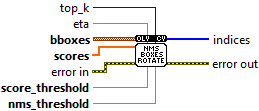
NmsBoxesRotated
OpenLvVision_OpenCv.lvlib:NmsBoxesRotated.vi
Performs non maximum suppression given boxes and corresponding scores.
For detailed information, please refer to the OpenCV documentation
| error in error in can accept error information wired from VIs previously called. Use this information to decide if any functionality should be bypassed in the event of errors from other VIs. Right-click the error in control on the front panel and select Explain Error or Explain Warning from the shortcut menu for more information about the error. |

| status status is TRUE (X) if an error occurred or FALSE (checkmark) to indicate a warning or that no error occurred. Right-click the error in control on the front panel and select Explain Error or Explain Warning from the shortcut menu for more information about the error. |

| code |

| source source describes the origin of the error or warning. Right-click the error in control on the front panel and select Explain Error or Explain Warning from the shortcut menu for more information about the error. |

| bboxes a set of bounding boxes to apply NMS. |

|

| CX |

| CY |
| Width |
| Height |
| Angle |
| scores a set of corresponding confidences. |

|
| score_threshold a threshold used to filter boxes by score. |
| nms_threshold a threshold used in non maximum suppression. |
| eta a coefficient in adaptive threshold |
| top_k if >0, keep at most top_k picked indices. |
| error out error in can accept error information wired from VIs previously called. Use this information to decide if any functionality should be bypassed in the event of errors from other VIs. Right-click the error in control on the front panel and select Explain Error or Explain Warning from the shortcut menu for more information about the error. |

| status status is TRUE (X) if an error occurred or FALSE (checkmark) to indicate a warning or that no error occurred. Right-click the error in control on the front panel and select Explain Error or Explain Warning from the shortcut menu for more information about the error. |

| code |

| source source describes the origin of the error or warning. Right-click the error in control on the front panel and select Explain Error or Explain Warning from the shortcut menu for more information about the error. |

| indices the kept indices of bboxes after NMS. |

|