FromImages
OpenLvVision_OpenCv.lvlib:Blob.lvclass:Blob FromImages.vi
Creates 4-dimensional blob from series of images. Optionally resizes and crops images from center, subtract mean values, scales values by scalefactor, swap Blue and Red channels.
For detailed information, please refer to the OpenCV documentation
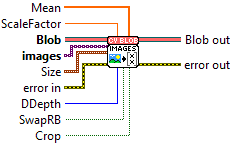
| error in error in can accept error information wired from VIs previously called. Use this information to decide if any functionality should be bypassed in the event of errors from other VIs. Right-click the error in control on the front panel and select Explain Error or Explain Warning from the shortcut menu for more information about the error. |

| status status is TRUE (X) if an error occurred or FALSE (checkmark) to indicate a warning or that no error occurred. Right-click the error in control on the front panel and select Explain Error or Explain Warning from the shortcut menu for more information about the error. |

| code |

| source source describes the origin of the error or warning. Right-click the error in control on the front panel and select Explain Error or Explain Warning from the shortcut menu for more information about the error. |

| ScaleFactor multiplier for images values. |

| Size |

| X |
| Y |
| SwapRB flag which indicates that swap first and last channels in 3-channel image is necessary. |
| Crop flag which indicates whether image will be cropped after resize or not |
| Mean with mean values which are subtracted from channels. Values are intended to be in (mean-R, mean-G, mean-B) order if image has BGR ordering and swapRB is true. |

| Numeric |
| Blob |

| DDepth Depth of output blob. Choose CV_32F or CV_8U. |

| images input images (all with 1-, 3- or 4-channels). |

| Image |

| error out error in can accept error information wired from VIs previously called. Use this information to decide if any functionality should be bypassed in the event of errors from other VIs. Right-click the error in control on the front panel and select Explain Error or Explain Warning from the shortcut menu for more information about the error. |

| status status is TRUE (X) if an error occurred or FALSE (checkmark) to indicate a warning or that no error occurred. Right-click the error in control on the front panel and select Explain Error or Explain Warning from the shortcut menu for more information about the error. |

| code |

| source source describes the origin of the error or warning. Right-click the error in control on the front panel and select Explain Error or Explain Warning from the shortcut menu for more information about the error. |

| Blob out A 4-dimensional tensor (N, C, H, W) containing preprocessed image data. |
