Create_Size
OpenLvVision_OpenCv.lvlib:Cuda.lvlib:HostMem.lvclass:HostMem Create_Size.vi
Object by Reference!
Creates from host memory with the given size.
For detailed information, please refer to the OpenCV documentation
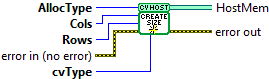
| error in (no error) The error in cluster can accept error information wired from VIs previously called. Use this information to decide if any functionality should be bypassed in the event of errors from other VIs. The pop-up option Explain Error (or Explain Warning) gives more information about the error displayed. |

| status The status boolean is either TRUE (X) for an error, or FALSE (checkmark) for no error or a warning. The pop-up option Explain Error (or Explain Warning) gives more information about the error displayed. |

| code The code input identifies the error or warning. The pop-up option Explain Error (or Explain Warning) gives more information about the error displayed. |

| source The source string describes the origin of the error or warning. The pop-up option Explain Error (or Explain Warning) gives more information about the error displayed. |

| AllocType PAGE_LOCKED: Allocates pinned memory, which is essential for accelerating data transfer between CPU and GPU. SHARED: Specifies zero-copy memory, which enables mapping host memory to the GPU address space, reducing copy overhead, especially on integrated GPUs. WRITE_COMBINED: Allocates write-combined memory, which is not cached by the CPU, making it efficient for write-only data destined for the GPU. |

| Rows The height of the matrix or image. This represents the number of vertical pixels (or data elements) in the memory block. |
| Cols |
| cvType The OpenCV data type and channel configuration you want to allocate |
| error out The error out cluster passes error or warning information out of a VI to be used by other VIs. The pop-up option Explain Error (or Explain Warning) gives more information about the error displayed. |

| status The status boolean is either TRUE (X) for an error, or FALSE (checkmark) for no error or a warning. The pop-up option Explain Error (or Explain Warning) gives more information about the error displayed. |

| code The code input identifies the error or warning. The pop-up option Explain Error (or Explain Warning) gives more information about the error displayed. |

| source The source string describes the origin of the error or warning. The pop-up option Explain Error (or Explain Warning) gives more information about the error displayed. |

| HostMem |
