Download_HostMem
OpenLvVision_OpenCv.lvlib:Cuda.lvlib:GpuMat.lvclass:GpuMat Download_HostMem.vi
Transfers data from the GPU device memory (GpuMat) back to a page-locked (pinned) host memory buffer (HostMem). Just like the upload function, using pinned memory accelerates the transfer. Providing a `Stream` reference allows this download to happen asynchronously.
For detailed information, please refer to the OpenCV documentation
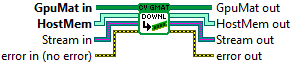
| error in (no error) The error in cluster can accept error information wired from VIs previously called. Use this information to decide if any functionality should be bypassed in the event of errors from other VIs. The pop-up option Explain Error (or Explain Warning) gives more information about the error displayed. |

| status The status boolean is either TRUE (X) for an error, or FALSE (checkmark) for no error or a warning. The pop-up option Explain Error (or Explain Warning) gives more information about the error displayed. |

| code The code input identifies the error or warning. The pop-up option Explain Error (or Explain Warning) gives more information about the error displayed. |

| source The source string describes the origin of the error or warning. The pop-up option Explain Error (or Explain Warning) gives more information about the error displayed. |

| GpuMat in |

| HostMem Represents a specialized buffer of page-locked (or "pinned") host system memory. |

| Stream in This class encapsulates a queue of asynchronous calls. |

| error out The error out cluster passes error or warning information out of a VI to be used by other VIs. The pop-up option Explain Error (or Explain Warning) gives more information about the error displayed. |

| status The status boolean is either TRUE (X) for an error, or FALSE (checkmark) for no error or a warning. The pop-up option Explain Error (or Explain Warning) gives more information about the error displayed. |

| code The code input identifies the error or warning. The pop-up option Explain Error (or Explain Warning) gives more information about the error displayed. |

| source The source string describes the origin of the error or warning. The pop-up option Explain Error (or Explain Warning) gives more information about the error displayed. |

| GpuMat out |

| Stream out This class encapsulates a queue of asynchronous calls. |

| HostMem out |
