SVDCompute
OpenLvVision_OpenCv.lvlib:SVDCompute.vim
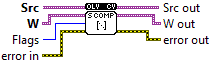
Decomposes matrix and stores the results to user-provided matrices
For detailed information, please refer to the OpenCV documentation
| error in error in can accept error information wired from VIs previously called. Use this information to decide if any functionality should be bypassed in the event of errors from other VIs. Right-click the error in control on the front panel and select Explain Error or Explain Warning from the shortcut menu for more information about the error. |

| status status is TRUE (X) if an error occurred or FALSE (checkmark) to indicate a warning or that no error occurred. Right-click the error in control on the front panel and select Explain Error or Explain Warning from the shortcut menu for more information about the error. |

| code |

| source source describes the origin of the error or warning. Right-click the error in control on the front panel and select Explain Error or Explain Warning from the shortcut menu for more information about the error. |

| Src decomposed matrix. The depth has to be CV_32F or CV_64F. |

| W |
| Flags MODIFY_A: allow the algorithm to modify the decomposed matrix; it can save space and speed up processing. currently ignored. NO_UV: indicates that only a vector of singular values `w` is to be processed, while u and vt will be set to empty matrices FULL_UV: when the matrix is not square, by default the algorithm produces u and vt matrices of sufficiently large size for the further A reconstruction; if, however, FULL_UV flag is specified, u and vt will be full-size square orthogonal matrices. |
| error out error in can accept error information wired from VIs previously called. Use this information to decide if any functionality should be bypassed in the event of errors from other VIs. Right-click the error in control on the front panel and select Explain Error or Explain Warning from the shortcut menu for more information about the error. |

| status status is TRUE (X) if an error occurred or FALSE (checkmark) to indicate a warning or that no error occurred. Right-click the error in control on the front panel and select Explain Error or Explain Warning from the shortcut menu for more information about the error. |

| code |

| source source describes the origin of the error or warning. Right-click the error in control on the front panel and select Explain Error or Explain Warning from the shortcut menu for more information about the error. |

| Src out |

| W out calculated singular values |