BatchDistance
OpenLvVision_OpenCv.lvlib:BatchDistance.vim
Naive nearest neighbor finder
For detailed information, please refer to the OpenCV documentation
| error in error in can accept error information wired from VIs previously called. Use this information to decide if any functionality should be bypassed in the event of errors from other VIs. Right-click the error in control on the front panel and select Explain Error or Explain Warning from the shortcut menu for more information about the error. |

| status status is TRUE (X) if an error occurred or FALSE (checkmark) to indicate a warning or that no error occurred. Right-click the error in control on the front panel and select Explain Error or Explain Warning from the shortcut menu for more information about the error. |

| code |

| source source describes the origin of the error or warning. Right-click the error in control on the front panel and select Explain Error or Explain Warning from the shortcut menu for more information about the error. |

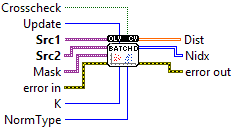
| Src1 The matrix of query vectors (rows) for which you want to find matches. |

| Src2 The matrix of target or training vectors (rows) that serves as the reference database. Same col count as Src1 |
| Mask An optional matrix where a value of 0 prevents the distance calculation for that specific query-target pair. |
| NormType |
| K The number of nearest neighbors to find; set to 0 to calculate the full distance matrix |
| Update An internal flag for sliding-window updates; typically set to 0. |
| Crosscheck If true, ensures mutual matching (matches are only valid if A is the closest to B and B is the closest to A). |
| error out error in can accept error information wired from VIs previously called. Use this information to decide if any functionality should be bypassed in the event of errors from other VIs. Right-click the error in control on the front panel and select Explain Error or Explain Warning from the shortcut menu for more information about the error. |

| status status is TRUE (X) if an error occurred or FALSE (checkmark) to indicate a warning or that no error occurred. Right-click the error in control on the front panel and select Explain Error or Explain Warning from the shortcut menu for more information about the error. |

| code |

| source source describes the origin of the error or warning. Right-click the error in control on the front panel and select Explain Error or Explain Warning from the shortcut menu for more information about the error. |

| Dist The output matrix containing the calculated distances |

|

| Nidx The output matrix containing the row indices of the found neighbors in src2 |

|