Project
OpenLvVision_OpenCv.lvlib:PCA.lvclass:PCA Project.vi
Projects vector(s) to the principal component subspace.
The methods project one or more vectors to the principal component subspace, where each vector projection is represented by coefficients in the principal component basis.
For detailed information, please refer to the OpenCV documentation
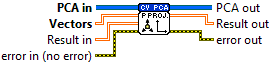
| error in (no error) The error in cluster can accept error information wired from VIs previously called. Use this information to decide if any functionality should be bypassed in the event of errors from other VIs. The pop-up option Explain Error (or Explain Warning) gives more information about the error displayed. |

| status The status boolean is either TRUE (X) for an error, or FALSE (checkmark) for no error or a warning. The pop-up option Explain Error (or Explain Warning) gives more information about the error displayed. |

| code The code input identifies the error or warning. The pop-up option Explain Error (or Explain Warning) gives more information about the error displayed. |

| source The source string describes the origin of the error or warning. The pop-up option Explain Error (or Explain Warning) gives more information about the error displayed. |

| Vectors input vector(s); must have the same dimensionality and the same layout as the input data used at PCA phase, that is, if DATA_AS_ROW are specified, then vec.cols==data.cols (vector dimensionality) and vec.rows is the number of vectors to project, and the same is true for the PCA::DATA_AS_COL case. |

| Numeric |

| PCA in |

| Result in Reuse a previously created array to enhance performance. |
| Numeric |
| error out The error out cluster passes error or warning information out of a VI to be used by other VIs. The pop-up option Explain Error (or Explain Warning) gives more information about the error displayed. |

| status The status boolean is either TRUE (X) for an error, or FALSE (checkmark) for no error or a warning. The pop-up option Explain Error (or Explain Warning) gives more information about the error displayed. |

| code The code input identifies the error or warning. The pop-up option Explain Error (or Explain Warning) gives more information about the error displayed. |

| source The source string describes the origin of the error or warning. The pop-up option Explain Error (or Explain Warning) gives more information about the error displayed. |

| PCA out |

| Result out input vector(s); must have the same dimensionality and the same layout as the input data used at PCA phase, that is, if DATA_AS_ROW are specified, then vec.cols==data.cols (vector dimensionality) and vec.rows is the number of vectors to project, and the same is true for the PCA::DATA_AS_COL case. |

| Numeric |
