ComputeMaxComponents
OpenLvVision_OpenCv.lvlib:PCA.lvclass:PCA ComputeMaxComponents.vi
Performs PCA of the supplied dataset. It is safe to reuse the same PCA structure for multiple datasets. That is, if the structure has been previously used with another dataset, the existing internal data is reclaimed and the new eigenvalues, eigenvectors and mean are allocated and computed.
For detailed information, please refer to the OpenCV documentation
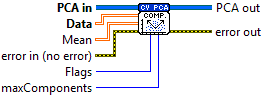
| error in (no error) The error in cluster can accept error information wired from VIs previously called. Use this information to decide if any functionality should be bypassed in the event of errors from other VIs. The pop-up option Explain Error (or Explain Warning) gives more information about the error displayed. |

| status The status boolean is either TRUE (X) for an error, or FALSE (checkmark) for no error or a warning. The pop-up option Explain Error (or Explain Warning) gives more information about the error displayed. |

| code The code input identifies the error or warning. The pop-up option Explain Error (or Explain Warning) gives more information about the error displayed. |

| source The source string describes the origin of the error or warning. The pop-up option Explain Error (or Explain Warning) gives more information about the error displayed. |

| Data input samples stored as matrix rows or matrix columns. |

| Numeric |

| maxComponents maximum number of components that PCA should retain; by default, all the components are retained. |
| Mean optional mean value; if the matrix is empty (noArray()), the mean is computed from the data. |
| Numeric |
| Flags DATA_AS_ROW =indicates that the input samples are stored as matrix rows DATA_AS_COL = indicates that the input samples are stored as matrix columns USE_AVG |

| PCA in |

| error out The error out cluster passes error or warning information out of a VI to be used by other VIs. The pop-up option Explain Error (or Explain Warning) gives more information about the error displayed. |

| status The status boolean is either TRUE (X) for an error, or FALSE (checkmark) for no error or a warning. The pop-up option Explain Error (or Explain Warning) gives more information about the error displayed. |

| code The code input identifies the error or warning. The pop-up option Explain Error (or Explain Warning) gives more information about the error displayed. |

| source The source string describes the origin of the error or warning. The pop-up option Explain Error (or Explain Warning) gives more information about the error displayed. |

| PCA out |
