PerspectiveTransform
OpenLvVision_OpenCv.lvlib:PerspectiveTransform.vim
Performs the perspective matrix transformation of vectors.
The function cv::perspectiveTransform transforms every element of src by treating it as a 2D or 3D vector, in the following way:
where the intermediate 4D vector is calculated as:
and the scale factor $w$ is defined as:
In the case of 2D vector transformation $(x, y)$, the $z$ component is omitted and the matrix mat is typically $3 \times 3$ or $4 \times 4$. The function is commonly used for warping images or projecting 3D points onto a 2D plane with perspective distortion.
For detailed information, please refer to the OpenCV documentation
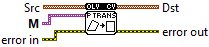
| error in error in can accept error information wired from VIs previously called. Use this information to decide if any functionality should be bypassed in the event of errors from other VIs. Right-click the error in control on the front panel and select Explain Error or Explain Warning from the shortcut menu for more information about the error. |

| status status is TRUE (X) if an error occurred or FALSE (checkmark) to indicate a warning or that no error occurred. Right-click the error in control on the front panel and select Explain Error or Explain Warning from the shortcut menu for more information about the error. |

| code |

| source source describes the origin of the error or warning. Right-click the error in control on the front panel and select Explain Error or Explain Warning from the shortcut menu for more information about the error. |

| Src Floating point 1D array. Each element is a 2D/3D vector to be transformed. |

| Point |

| X |

| Y |
| M 3x3 or 4x4 floating-point transformation matrix. |

| error out error in can accept error information wired from VIs previously called. Use this information to decide if any functionality should be bypassed in the event of errors from other VIs. Right-click the error in control on the front panel and select Explain Error or Explain Warning from the shortcut menu for more information about the error. |

| status status is TRUE (X) if an error occurred or FALSE (checkmark) to indicate a warning or that no error occurred. Right-click the error in control on the front panel and select Explain Error or Explain Warning from the shortcut menu for more information about the error. |

| code |

| source source describes the origin of the error or warning. Right-click the error in control on the front panel and select Explain Error or Explain Warning from the shortcut menu for more information about the error. |

| Dst output array of the same size and type as src. |

| Point |

| X |

| Y |