Flip
OpenLvVision_OpenCv.lvlib:Flip.vim
Flips a 2D array around vertical, horizontal, or both axes.
The function cv::flip flips the array in one of three different ways (row and column indices are 0-based):
The example scenarios of using the function are the following:
- Vertical flipping (
flipCode == 0): Used to switch between top-left and bottom-left image origin. This is a typical operation in video processing on Microsoft Windows OS. - Horizontal flipping (
flipCode > 0): Used with a subsequent horizontal shift and absolute difference calculation to check for vertical-axis symmetry. - Simultaneous horizontal and vertical flipping (
flipCode < 0): Used with a subsequent shift and absolute difference calculation to check for central symmetry. - Reversing point arrays: The function can also be used to reverse the order of 1D point arrays (using
flipCode > 0orflipCode == 0).
For detailed information, please refer to the OpenCV documentation
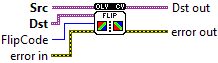
| error in error in can accept error information wired from VIs previously called. Use this information to decide if any functionality should be bypassed in the event of errors from other VIs. Right-click the error in control on the front panel and select Explain Error or Explain Warning from the shortcut menu for more information about the error. |

| status status is TRUE (X) if an error occurred or FALSE (checkmark) to indicate a warning or that no error occurred. Right-click the error in control on the front panel and select Explain Error or Explain Warning from the shortcut menu for more information about the error. |

| code |

| source source describes the origin of the error or warning. Right-click the error in control on the front panel and select Explain Error or Explain Warning from the shortcut menu for more information about the error. |

| Src input array. |

| Dst output array of the same size and type as src. |
| FlipCode a flag to specify how to flip the array; 0 means flipping around the x-axis and positive value (for example, 1) means flipping around y-axis. Negative value (for example, -1) means flipping around both axes. |
| error out error in can accept error information wired from VIs previously called. Use this information to decide if any functionality should be bypassed in the event of errors from other VIs. Right-click the error in control on the front panel and select Explain Error or Explain Warning from the shortcut menu for more information about the error. |

| status status is TRUE (X) if an error occurred or FALSE (checkmark) to indicate a warning or that no error occurred. Right-click the error in control on the front panel and select Explain Error or Explain Warning from the shortcut menu for more information about the error. |

| code |

| source source describes the origin of the error or warning. Right-click the error in control on the front panel and select Explain Error or Explain Warning from the shortcut menu for more information about the error. |

| Dst out |
