Solve
OpenLvVision_OpenCv.lvlib:Solve.vim
Solves one or more linear systems or least-squares problems.
The function solve solves a linear system or least-squares problem:
- Linear System Solution:$ \texttt{dst} = \arg \min_X \| \texttt{src1} \cdot X - \texttt{src2} \| $
The function finds the result dst (or X in the formula) that satisfies the linear system:
If src1 is a non-singular square matrix, the solution is exact (DECOMP_LU or DECOMP_CHOLESKY). Otherwise, the function calculates the best least-squares solution (DECOMP_SVD or DECOMP_QR).
For detailed information, please refer to the OpenCV documentation
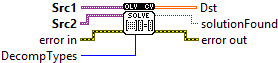
| error in error in can accept error information wired from VIs previously called. Use this information to decide if any functionality should be bypassed in the event of errors from other VIs. Right-click the error in control on the front panel and select Explain Error or Explain Warning from the shortcut menu for more information about the error. |

| status status is TRUE (X) if an error occurred or FALSE (checkmark) to indicate a warning or that no error occurred. Right-click the error in control on the front panel and select Explain Error or Explain Warning from the shortcut menu for more information about the error. |

| code |

| source source describes the origin of the error or warning. Right-click the error in control on the front panel and select Explain Error or Explain Warning from the shortcut menu for more information about the error. |

| Src1 input matrix on the left-hand side of the system. |

| Src2 input matrix on the right-hand side of the system. |
| DecompTypes solution (matrix inversion) method: DECOMP_LU: Gaussian elimination with the optimal pivot element chosen. DECOMP_SVD : singular value decomposition (SVD) method; the system can be over-defined and/or the matrix DECOMP_EIG: eigenvalue decomposition; the matrix src1 must be symmetrical DECOMP_CHOLESKY: Cholesky factorization. he matrix src1 must be symmetrical and positively defined. DECOMP_QR: QR factorization; the system can be over-defined and/or the matrix src1 can be singular DECOMP_NORMAL:while all the previous flags are mutually exclusive, this flag can be used together with any of the previous; it means that the normal equations |
| error out error in can accept error information wired from VIs previously called. Use this information to decide if any functionality should be bypassed in the event of errors from other VIs. Right-click the error in control on the front panel and select Explain Error or Explain Warning from the shortcut menu for more information about the error. |

| status status is TRUE (X) if an error occurred or FALSE (checkmark) to indicate a warning or that no error occurred. Right-click the error in control on the front panel and select Explain Error or Explain Warning from the shortcut menu for more information about the error. |

| code |

| source source describes the origin of the error or warning. Right-click the error in control on the front panel and select Explain Error or Explain Warning from the shortcut menu for more information about the error. |

| solutionFound If an solution was found |
| Dst output solution. |

| Numeric |
