CreateAndCompute
OpenLvVision_OpenCv.lvlib:LDA.lvclass:LDA CreateAndCompute.vim
Initializes a new cv::LDA object and immediately performs the Linear Discriminant Analysis calculation on the provided dataset.
For detailed information, please refer to the OpenCV documentation
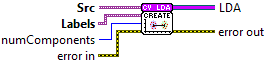
| error in error in can accept error information wired from VIs previously called. Use this information to decide if any functionality should be bypassed in the event of errors from other VIs. Right-click the error in control on the front panel and select Explain Error or Explain Warning from the shortcut menu for more information about the error. |

| status status is TRUE (X) if an error occurred or FALSE (checkmark) to indicate a warning or that no error occurred. Right-click the error in control on the front panel and select Explain Error or Explain Warning from the shortcut menu for more information about the error. |

| code |

| source source describes the origin of the error or warning. Right-click the error in control on the front panel and select Explain Error or Explain Warning from the shortcut menu for more information about the error. |

| numComponents The number of components (dimensions) to keep in the result. 0 = Automatic (Recommended). Keeps (N_classes - 1) components. |
| Src The training data matrix. The data must be floating-point (Single or Double). The layout is row-major, meaning each row represents one sample and each column represents a feature. |

| Labels The labels corresponding to the training data. This must be a 1D array. The number of labels must exactly match the number of rows in the Data input. Example: [0, 0, 1, 1] indicates the first two samples belong to Class 0 and the next two belong to Class 1. |
| error out error in can accept error information wired from VIs previously called. Use this information to decide if any functionality should be bypassed in the event of errors from other VIs. Right-click the error in control on the front panel and select Explain Error or Explain Warning from the shortcut menu for more information about the error. |

| status status is TRUE (X) if an error occurred or FALSE (checkmark) to indicate a warning or that no error occurred. Right-click the error in control on the front panel and select Explain Error or Explain Warning from the shortcut menu for more information about the error. |

| code |

| source source describes the origin of the error or warning. Right-click the error in control on the front panel and select Explain Error or Explain Warning from the shortcut menu for more information about the error. |

| LDA |
