Cast
OpenLvVision_Image.lvlib:Management.lvlib:Cast.vi
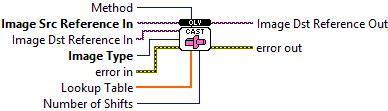
Converts the image's pixel data type.
| error in error in can accept error information wired from VIs previously called. Use this information to decide if any functionality should be bypassed in the event of errors from other VIs. Right-click the error in control on the front panel and select Explain Error or Explain Warning from the shortcut menu for more information about the error. |

| status status is TRUE (X) if an error occurred or FALSE (checkmark) to indicate a warning or that no error occurred. Right-click the error in control on the front panel and select Explain Error or Explain Warning from the shortcut menu for more information about the error. |

| code |

| source source describes the origin of the error or warning. Right-click the error in control on the front panel and select Explain Error or Explain Warning from the shortcut menu for more information about the error. |

| Image Src Reference In An Image reference is a handle to the actual image data in memory. It's important to note that you are responsible for manually releasing (deallocating) the memory associated with this image reference when it's no longer needed to prevent memory leaks. |

| Image Dst Reference In An Image reference is a handle to the actual image data in memory. It's important to note that you are responsible for manually releasing (deallocating) the memory associated with this image reference when it's no longer needed to prevent memory leaks. |
| Image Type ImageFormat enum defines pixel data type: MonoU8 (8-bit unsigned ), MonoU16 (16-bit unsigned), MonoI16 (16-bit signed), MonoSGL (single-precision float), ColorU32 (8x4 unsigned integer, RGBA), ColorU64 (16x4 unsigned integer, RGBA). |

| Method - Use Bit Depth (0): Casts based on the image's bit depth information. Only works for integer types. - Shift (1): Casts by right-shifting the pixel values by a specified "Number of Shifts". Only works for integer types. - Use Lookup Table (2): Casts using a provided "Lookup Table". Works for MonoU8, MonoU16, MonoSGL |

| Number of Shifts This specifies the number of bits to right-shift the pixel values during casting. |
| Lookup Table Array where the index is the original value, and the values at that indexs are the new values. |

| Numeric |

| error out error in can accept error information wired from VIs previously called. Use this information to decide if any functionality should be bypassed in the event of errors from other VIs. Right-click the error in control on the front panel and select Explain Error or Explain Warning from the shortcut menu for more information about the error. |

| status status is TRUE (X) if an error occurred or FALSE (checkmark) to indicate a warning or that no error occurred. Right-click the error in control on the front panel and select Explain Error or Explain Warning from the shortcut menu for more information about the error. |

| code |

| source source describes the origin of the error or warning. Right-click the error in control on the front panel and select Explain Error or Explain Warning from the shortcut menu for more information about the error. |

| Image Dst Reference Out An Image reference is a handle to the actual image data in memory. It's important to note that you are responsible for manually releasing (deallocating) the memory associated with this image reference when it's no longer needed to prevent memory leaks. |
